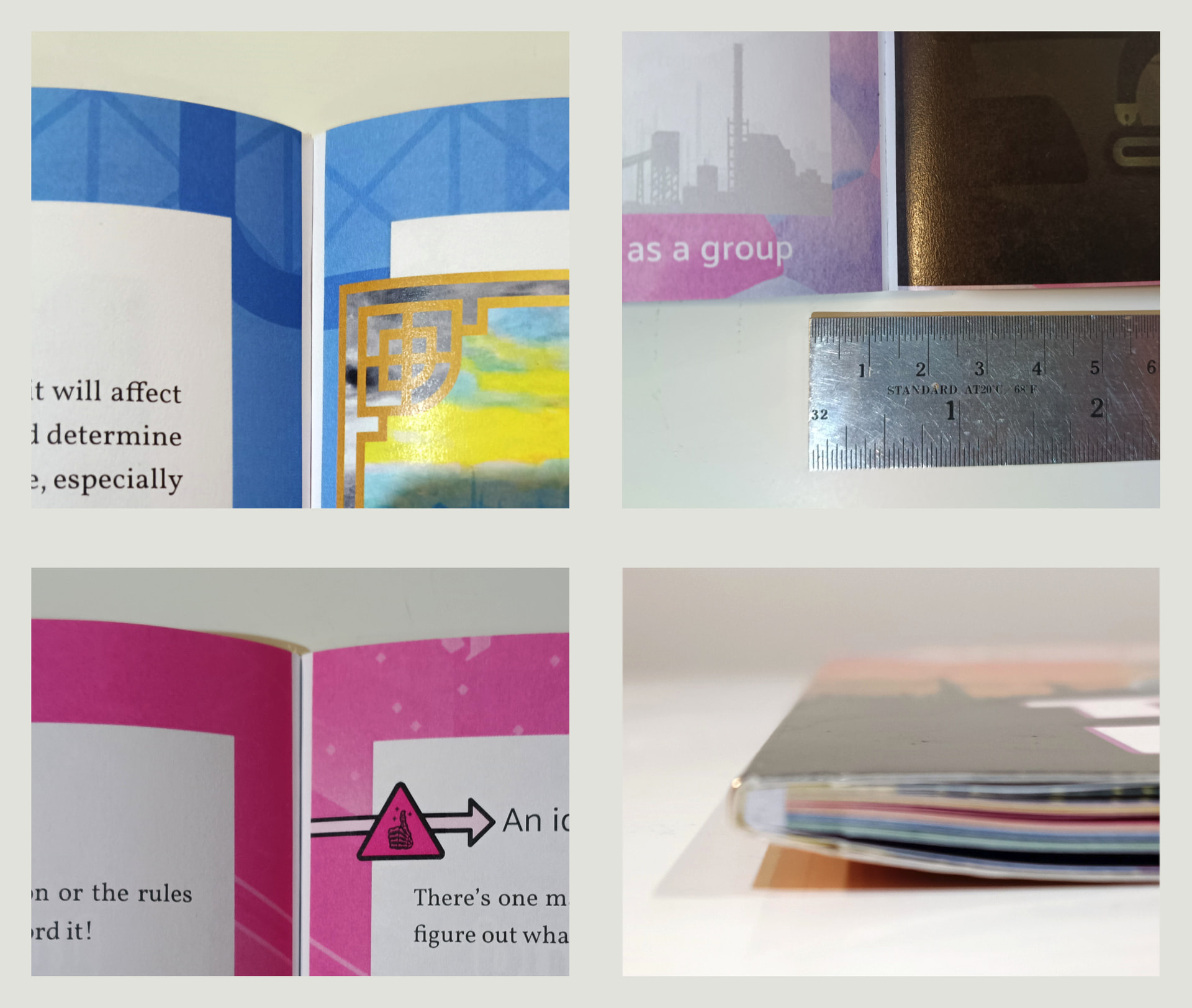
When I was setting up a title for print publishing, I initially uploaded a file without the 0.125 inches of inner bleed by mistake, causing Lulu to automatically insert a white gutter. Because my pages have coloured borders, I spotted the issue in the preview. I then uploaded a revised file which corrected my mistake, and it showed up as fixed in the preview, so I ordered a proof copy.
I just received it and found it has 0.125 inches of white near the spine, which I think means my original file got printed, not the updated one. Currently when I click “Download Interior PDF” I get the expected, corrected file back. Did I just need to wait for some period for the change to finish going through, despite the preview having updated? Or are changes to existing book files not getting through to Lulu?
The PDFs are sent through to Lulu at checkout time, so they should always use the most recent files.
Could you post a couple of photos of the issue with your book along with an explanation of what you were expecting instead? Also say how many pages you see it on - is it all of them or just a few specific ones? You’re welcome to email photos to support@rpgtrader.com if you would prefer.
I would expect the coloured parts to extend all the way into the spine of the book. The trim size is 6x9 inches and (in the corrected file I uploaded) the colour extends all the way through the 0.125in bleed that Lulu requires, i.e., the PDF pages are 6.25x9.25 inches.
I had initially uploaded a 6.125x9.25in PDF (without the 0.125in inner bleed) by mistake, which is why I thought the wrong file must have been printed, with the printer automatically padding it with white space.
I measured the book’s edge (see the 4th photo), and the white strip is 0.125in on each page. The book was trimmed fairly accurately by the printer, but even if it was misaligned, this white area should show the bleed colours on each page rather than being white.
How long after uploading the updated interior file did you place the order? While the old file should not have been sent, even if you ordered it immediately afterwards, there’s a chance there was a product cache that stored it and the old file was sent. Were there any other changes you made to the files that might indicate if you the old version was used?
Once you let me know that, I’ll follow up with the printer. Having tested your file thoroughly here, the issue seems to be either a file cache issue (which will have already resolved itself) or a one-off print issue that shouldn’t happen again.
Either way, once we’re sure the issue is resolved, I’m happy to refund this order, or for you to order a fresh copy at no cost.
An additional request that might help here - could you email your old version of the file to us? That’s the one from before you added the internal bleed. You can send it to support@rpgtrader.com.
I ordered a copy fairly soon after updating the file – I don’t remember exactly as it was a couple of weeks ago, but I think within 10-30 minutes, after I had paged through the preview.
The revised version was just a re-export with different document bleed settings, so I can’t see any other way to check which version was printed. I’ll email you the previous file without the bleed. Thanks for looking into this!
Noting here that we resolved this over email. It was largely a one-off printing error, but has pushed us to update and improve the warning messages for potential formatting issues when previewing PDFs. This will make things more clear for creators, and reduce the risk of these kinds of issues.